Every HL7 v2 message carries its version in MSH-12: 2.3, 2.5.1 and so on. The version decides which fields exist, what they're called, which data type each one uses and which code table applies. Read a message as the wrong version and fields "disappear", components get mislabelled, and validation fills up with false errors.
The trouble is that MSH-12 is often wrong.
Why MSH-12 can't always be trusted
- Interfaces outlive their configuration. A feed set up years ago as v2.3 keeps saying v2.3 after the sending system is upgraded and starts sending newer fields.
- Interface engines rewrite headers. An engine in the middle may build a new MSH segment, with its own version number, around content from somewhere else.
- Lowest-common-denominator labels. Vendors sometimes claim an old version so older receivers accept the message, while still sending newer fields.
- Merged feeds. One connection can carry messages from several systems, each built for a different version.
So treat MSH-12 as a claim, and check it against the content.
Clue 1: how many fields a segment has
Segments gain fields over time. If a message has values in fields that don't exist yet in the version it claims, it was built for a later version.
| Segment | Fields by version | What it tells you |
|---|---|---|
PID | 30 in v2.3 and 2.3.1 · 38 in v2.4 · 39 in v2.5 | Values past PID-30 mean v2.4 or later; PID-39 means v2.5 or later |
MSH | 19 in v2.3 · 20 in v2.3.1 · 21 in v2.4 to 2.5.1 · 25 from v2.6 | MSH-22 to MSH-25 point to v2.6 or later |
OBX | 17 in v2.3 · 19 in v2.4 and 2.5 · 25 in v2.5.1 | Values past OBX-19 (such as the performing organization in OBX-23) mean v2.5.1 or later |
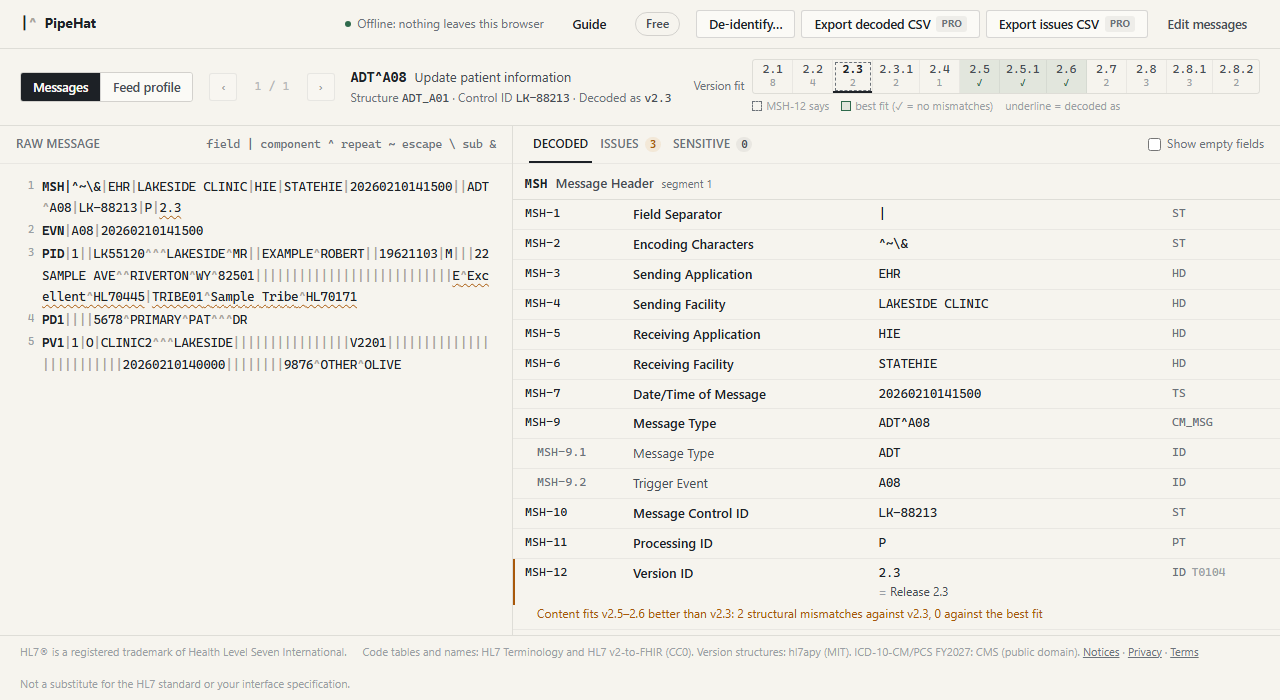
For example, this message claims v2.3, but its PID segment has values in fields 38 and 39:
MSH|^~\&|EHR|LAKESIDE CLINIC|HIE|STATEHIE|20260210141500||ADT^A08|LK-88213|P|2.3
EVN|A08|20260210141500
PID|1||LK55120^^^LAKESIDE^MR||EXAMPLE^ROBERT||19621103|M|||22 SAMPLE AVE^^RIVERTON^WY^82501|||||||||||||||||||||||||||E^Excellent^HL70445|TRIBE01^Sample Tribe^HL70171
In v2.3 the PID segment stops at field 30, so whoever built this message was working from v2.5 or later.
Clue 2: more components than the data type had
Data types change too. Many coded fields, such as PID-10 (Race) and DG1-3 (Diagnosis Code), use the CE data type up to v2.5.1, which has six components. From v2.6 they use CWE, which has nine components (22 from v2.7). A coded value in one of those fields with more than six components, such as a coding system version or original text in component 7 or beyond, points to v2.6 or later.
Timestamps are a weaker clue. They moved from the TS data type to DTM in v2.6, but the value usually looks the same (20260210141500), so they rarely settle the question on their own.
Clue 3: segments that didn't exist yet
Some segments only appear in later versions, so their presence dates the message:
SFT(software segment) first appears in v2.5.UAC(user authentication credential) andARV(access restrictions) first appear in v2.6.PRT(participation information) first appears in v2.7.
A segment that isn't part of the claimed version's message structure at all, even if it exists elsewhere in the standard, is worth a second look too.
Doing it systematically: score every version
Each clue on its own can mislead: a site might add a custom field, or a sender might leave one stray value in the wrong place. The reliable approach is to check the whole message against every version and count the structural mismatches for each:
- fields that don't exist in that version, or were withdrawn but still have values;
- more components than the data type has;
- fields that repeat when that version allows only one value;
- segments that aren't part of that version's message structure.
The version, or range of versions, with the fewest mismatches is the one the sender actually built against. That's what PipeHat's version fit strip does for every message, across all versions from 2.1 to 2.8.2:
What to do when the label and the content disagree
- Decode by content, not by label. Read the message as the best-fitting version, so field names and code tables match what was actually sent.
- Check the whole feed, not one message. Different messages on one connection can come from different systems. Profile a day of traffic and look at the spread of versions.
- Write it down. Record the real version in your interface specification, next to what
MSH-12says. - Tell the sender. Ask them to correct
MSH-12, or confirm which version they intend to follow, before the mismatch causes problems downstream.